10 Common Mistakes to Avoid When Cleaning an Air Purifier
Published: 3 Dec 2025
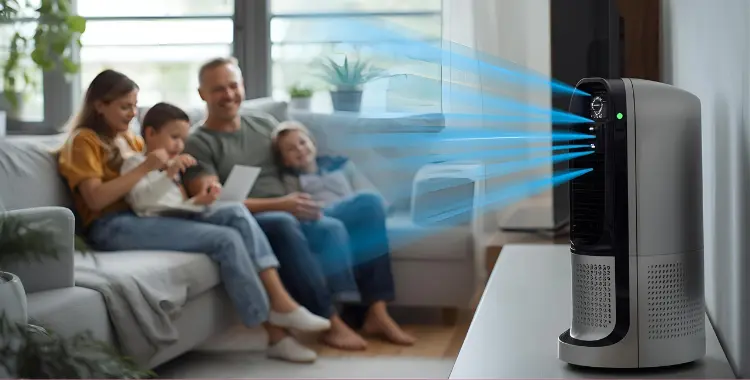
Cleaning your air purifier is essential for keeping your indoor air fresh and healthy. However, many people unknowingly make mistakes that can reduce efficiency, damage filters, or shorten the purifier’s lifespan.
In this guide, we’ll go over 10 common mistakes to avoid when cleaning an air purifier. Following these practices ensures your purifier works effectively, your filters last longer, and your home air stays clean and safe.
10 Mistakes to Avoid in Cleaning an Air Purifier
Avoiding these common mistakes ensures your HEPA filter works efficiently, lasts longer, and keeps your indoor air clean and healthy.
1. Washing Non-Washable HEPA Filters
Many air purifier owners make the mistake of washing HEPA filters that are not designed to be rinsed. True HEPA filters trap tiny particles, and exposing them to water can damage the fibers.
Damaged filters reduce air purification efficiency and may need replacement sooner than expected. Always check your purifier’s manual to see whether the HEPA filter is washable before cleaning.
2. Neglecting the Pre-Filter
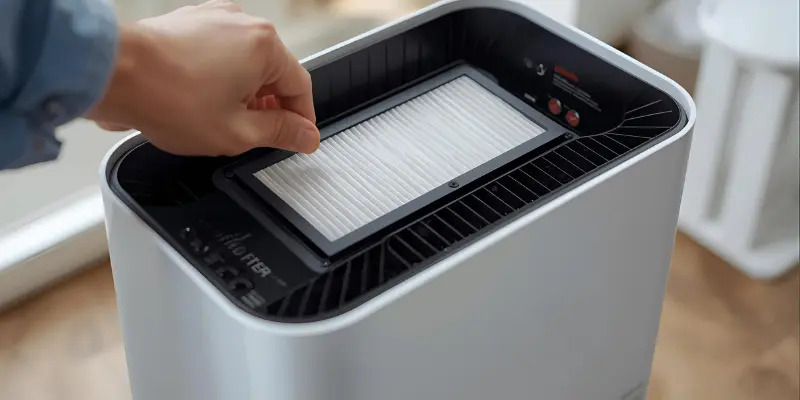
The pre-filter captures larger dust, hair, and debris before they reach the main HEPA filter. Skipping its cleaning allows dust to build up, which can clog the HEPA filter and reduce airflow.
Regularly vacuuming or rinsing the pre-filter (if washable) keeps your air purifier running efficiently and extends the life of the main filter.
3. Using Harsh Chemicals
Many people use household cleaners, sprays, or alcohol to clean their air purifier, thinking it will sanitize the device. In reality, harsh chemicals can damage filter fibers and internal components.
Instead, use a soft cloth, a brush, or follow the manufacturer’s recommended cleaning method. This keeps the purifier safe and maintains its efficiency.
4. Ignoring Sensors and Fan Cleaning
Dust can accumulate on sensors, fans, and grilles over time, reducing purifier efficiency and causing inaccurate readings. Many people forget to clean these components, which can lead to poor airflow and performance.
Use a soft brush or microfiber cloth to gently remove dust from sensors and fan blades, and check them every 1–2 months to keep your purifier working properly.
5. Shaking or Hitting Filters
Some people try to remove dust by tapping, shaking, or hitting their HEPA filters. This can damage the delicate fibers and release trapped dust back into the air.
Instead, gently vacuum or use a soft brush to remove loose dust without stressing the filter. Proper handling helps maintain filter efficiency and prolongs its lifespan.
To learn more about keeping your HEPA filters in top shape, check out our detailed guide on Air Purifier Maintenance Tips for HEPA Filters.
6. Overlooking Manufacturer Guidelines
Every air purifier model has specific cleaning instructions. Ignoring the manual can lead to mistakes like removing non-removable parts or using the wrong cleaning method.
Always follow the manufacturer’s guidelines to avoid damage, maintain efficiency, and ensure safe cleaning practices.
7. Forgetting to Reset Filter Indicators
Many modern purifiers have filter indicator lights to remind you when it’s time to replace or clean the filter. Failing to reset these lights after maintenance can give inaccurate alerts.
This may lead to unnecessary replacements or neglected cleaning. Always reset the indicator according to the purifier’s instructions after performing maintenance.
8. Unsafe Electrical Handling
Cleaning an air purifier while it’s still plugged in can be dangerous. Moisture or accidental contact with internal components may cause short circuits or electric shocks.
Always unplug the purifier before cleaning and avoid letting water or damp cloths touch any electrical parts. Safe handling protects both you and your device.
9. Over-Cleaning the Filters
Some people clean their HEPA or pre-filters too often, thinking more cleaning is better. Excessive cleaning can wear down filter fibers and reduce their lifespan.
Follow the manufacturer’s recommended cleaning schedule for each filter type. Proper timing keeps filters effective and lasting longer.
10. Cleaning in Dusty or Humid Areas
Cleaning your air purifier in a dusty or humid environment can reintroduce particles or moisture to the filter. This reduces efficiency and may promote mold or bacteria growth.
Always clean your purifier in a dry, relatively dust-free area to maintain air quality and prevent damage to the device.
If you also use a humidifier at home, you can follow this simple guide on How to Clean a Humidifier to keep your air quality even better.
Top Tips for Safe Air Purifier Cleaning
- Unplug first: Always disconnect your purifier before cleaning.
- Use soft tools: Microfiber cloths, soft brushes, or gentle vacuums prevent damage.
- Follow schedules: Clean pre-filters monthly and HEPA filters as recommended.
- Check surroundings: Clean in a dry, dust-free area to avoid contaminating the filter.
- Handle filters carefully: Avoid shaking or tapping HEPA filters aggressively.
These small precautions help your purifier stay efficient and extend the life of your filters.
FAQs
No. Only filters labeled as washable can be rinsed safely. Washing non-washable HEPA filters can damage the fibers and reduce cleaning efficiency, so always check the manual first.
Pre-filters generally need cleaning every month, while HEPA filters follow the manufacturer’s schedule, usually 6–12 months. Over-cleaning can wear out the filter faster. Regular maintenance keeps your indoor air consistently fresh.
No, harsh chemicals can damage both filter fibers and internal components. Stick to a soft cloth, brush, or the manufacturer-recommended cleaning method for safety. This prevents costly repairs and maintains purifier efficiency.
Dust on fans, sensors, or vents can reduce airflow and cause unusual sounds. Make sure all parts are dust-free and correctly placed to restore smooth operation. Proper cleaning ensures quieter, more effective performance.
Yes. Moisture can harm filters and even promote mold growth. Always clean in a dry, dust-free area to maintain efficiency and air quality. Dry cleaning also prevents potential long-term damage to the device.
Conclusion
Cleaning an air purifier is simple, but avoiding common mistakes is key to keeping it efficient and long-lasting. By staying mindful of proper filter care, safe handling, and following the manufacturer’s guidelines, you can prevent damage and ensure cleaner, healthier air at home.
Remember, these 10 common mistakes to avoid when cleaning an air purifier are easy to prevent with careful attention. Taking the right steps now helps your purifier perform better and keeps your indoor air fresh for years to come.




- Be Respectful
- Stay Relevant
- Stay Positive
- True Feedback
- Encourage Discussion
- Avoid Spamming
- No Fake News
- Don't Copy-Paste
- No Personal Attacks
- Be Respectful
- Stay Relevant
- Stay Positive
- True Feedback
- Encourage Discussion
- Avoid Spamming
- No Fake News
- Don't Copy-Paste
- No Personal Attacks
